The Inbox Model That Turns EAs Into Strategic Partners
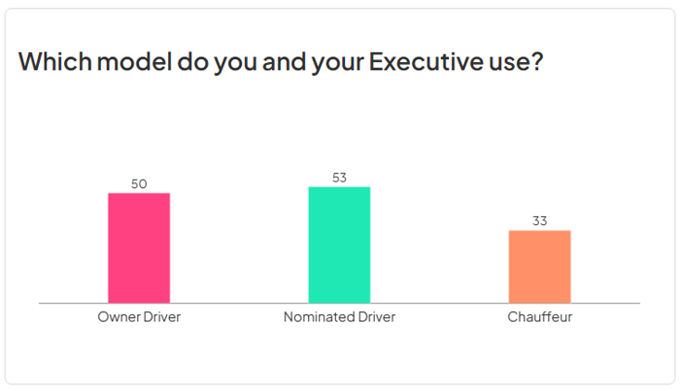
I asked attendees at the recent ThinkTank EA Summits a direct question: Which model do you and your executive currently use to manage the inbox? The results, shown in the graphic below, confirm something I've observed for years working with executives and their EAs: less than 25% use the model that positions the EA as a strategic partner and achieves the best results for the executive.
In my new book Triage Your Inbox, I set out these three models in detail, because understanding the difference between them is essential for any EA who wants to operate at the highest level of their capability, and for any executive who wants their time protected properly.
In the Owner–Driver model, the executive manages their own inbox independently. The EA assists at the margins — helping out when the executive is travelling or overwhelmed, but otherwise operating separately. This model wastes strategic capacity. The executive spends significant time on administrative sorting that doesn't require their authority, and bottlenecks are common.
In the Nominated–Driver model, both executive and EA manage the inbox simultaneously, often without clear coordination. Both read messages. Both flag things. Both forward items. Duplication is rife — "did you see that?", "I thought you were handling it." Friction, frustration, and fragmentation increase; alignment, flow, and fulfilment decrease. This is, in practice, the worst of the three models, because it combines the inefficiency of the first model with the confusion of unclear ownership.
In the Chauffeur model — the one I recommend without reservation — the EA drives the inbox. The executive is the passenger: they set the direction, provide the authority, and make the decisions only they can make. But they don't do the driving. The EA performs first-touch triage, assigns priority, clarifies next actions, and surfaces only what genuinely requires executive attention. The executive reviews a curated, decision-ready set of items rather than a raw, unprocessed firehose of information.
Here's why that sub-25% figure matters so much: my experience shows that approximately 80% of the email arriving in an executive's inbox can be handled entirely by a well-briefed EA. Only 20% genuinely requires the executive's personal attention. The Chauffeur model captures that division of labour and makes it explicit, consistent, and reliable. Every pair still operating as Owner–Driver or Nominated–Driver is leaving that 80% of untapped leverage on the table.
When I raise the Chauffeur model with EAs and ask why it is not being used, three answers recur: "my executive is a control freak," "they want to be across everything," and "there are confidentiality issues." All three point to the same root cause: not a general breakdown in the relationship, but the absence of a shared, reliable system the executive can trust to ensure nothing important is missed or mishandled.
That's really what the Riverbank Method, described alongside the Chauffeur model in the Triage Your Inbox book, is about for the executive: stepping out of the riverbed — where every drop of water (email) has to be processed as it arrives — and onto the bank, where the river still flows past but only the items that genuinely need their judgment are 'fished' out for their attention. The volume hasn't decreased, but the executive's relationship to it has changed completely.
Moving from Owner–Driver or Nominated–Driver to Chauffeur isn't really a technology change. It's a trust-and-structure change: clear authority boundaries, decision summaries instead of forwarded threads, and a shared system both the executive and EA can trust. Build that, and the 80/20 split stops being theoretical — the inbox is transformed into a high-performance workflow engine.
What strikes me isn't any single number — it's that every one of these tactics is well represented. These aren't rare, obscure workarounds. If you're reading this list and thinking "yes, I've tried most of those," you're in good company. They're the default toolkit almost every professional has used for 20 years or more, especially for emails that can't be completed straight away. And here's why none of it truly works: every one of these tactics does the same thing psychologically. It creates an open loop.
Psychologists use "open loop" to describe an unfinished commitment your brain won't let go of. The moment you read an email, register that something needs to happen, and close it without making a decision about it, you've created an open loop. Your brain doesn't release it just because you've done something that feels like progress. It keeps that item in working memory, quietly monitoring for the moment you'll come back and finish the job. But working memory wasn't built to hold dozens of these unresolved threads at once. Each one, alone, is trivial. Collectively, they're what makes an inbox feel unbearable long before you've actually done anything with it.
And the cognitive weight compounds every time you re-read a message: the email you glance past at 9am feels a little heavier by 2pm, heavier still by the next morning, even though nothing about the email itself has changed. That's not a mood. It's cognitive residue building up with every unresolved pass.
The knock-on effects are exactly what most people describe as "just how email feels": a low-grade anxiety that doesn't go away even when you're not looking at your inbox, difficulty concentrating on the task in front of you because part of your attention is still tied up in everything left undecided, and the pervasive sense of being behind no matter how hard you're working. It's the inevitable output of a brain doing exactly what it's designed to do with unresolved commitments — hold onto them. None of that is a personal failing. It is the predictable consequence of operating without a system in a context that requires one.
That's the whole premise behind the 4D framework I explain in my new book ‘Triage Your Inbox’: every email gets one of only four decisions — Delete, Deal, Delegate, or Decide — the first time you touch it. Not moved to a folder for attention someday. Not a flag "for later." Not a colour that means something today and nothing next week. Each email gets a decision, with a clear next action and a clear "when," if it can't be dealt with immediately. That way the loop actually closes instead of just looking closed.
If your current system is a flag, a folder, or one of the other strategies, you're not doing anything wrong — you're doing what almost everyone in that conference room is also doing. But when you can configure your email software to help you capture the next action and due date for emails that can't be completed the first time you read them, you close the loop and free up mental bandwidth and headspace. Your system carries the load — you carry only the thinking and decision-making.
Register Your Interest in the ‘Triage Your Inbox’ Book
If you are interested in being one of the first to receive a copy of my new book ‘Triage Your Inbox’, please click below to register.